
Kaizen automatically calculates the cost of every workflow execution so you always know what you're spending. This page explains how costs are computed and how to monitor them. For plan pricing, included usage, and billing mechanics, see Pricing & Billing.
How Costs Are Calculated
Every workflow execution includes two cost components:
Base Execution Charge: $0.001 per execution
AI Model Usage: Variable cost based on token consumption
modelCost = (inputTokens × inputPrice + outputTokens × outputPrice) / 1,000,000
totalCost = baseExecutionCharge + modelCost
AI model prices are per million tokens. The calculation divides by 1,000,000 to get the actual cost. Workflows without AI blocks only incur the base execution charge.
Hosted Models vs. Your Own API Keys
How model usage is priced depends on whose API key the request uses:
- Hosted models (Kaizen-provided API keys): token costs are billed at the provider's base price with a 1.5x multiplier. The multiplier covers infrastructure and API management costs.
- Bring your own API key (BYOK): you pay your provider directly at their rates, with no markup from Kaizen. Only the $0.001 base execution charge applies.
- Local models (e.g. Ollama, vLLM): no token cost at all — only the base execution charge.
Per-model token prices are not listed here because they change frequently. The in-app model catalog is the source of truth: current pricing is shown when you select a model in the workflow editor, and per-execution costs in your logs always reflect the prices in effect at execution time.
Model Breakdown in Logs
For workflows using AI blocks, you can view detailed cost information in the logs:
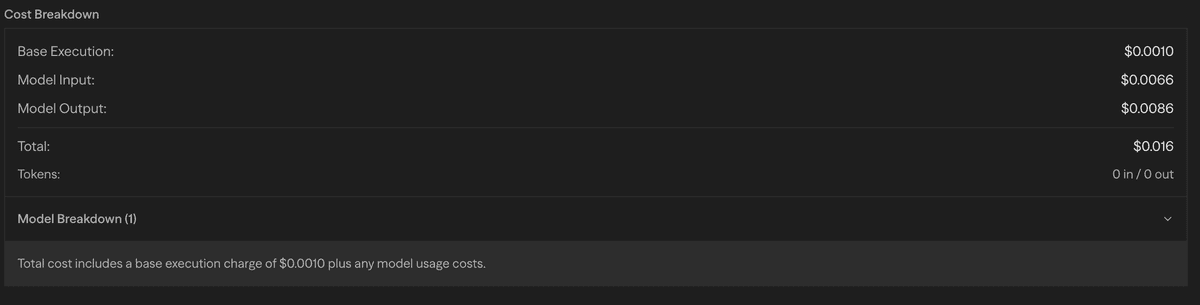
The model breakdown shows:
- Token Usage: Input and output token counts for each model
- Cost Breakdown: Individual costs per model and operation
- Model Distribution: Which models were used and how many times
- Total Cost: Aggregate cost for the entire workflow execution
Cost Optimization Strategies
- Model Selection: Choose models based on task complexity. Simple tasks can use small, inexpensive models while complex reasoning may warrant frontier models.
- Prompt Engineering: Well-structured, concise prompts reduce token usage without sacrificing quality.
- Bring Your Own Key: Use your own provider API keys to pay base prices with no markup.
- Local Models: Use Ollama or vLLM for non-critical tasks to eliminate API costs entirely.
- Caching and Reuse: Store frequently used results in variables or files to avoid repeated AI model calls.
- Batch Processing: Process multiple items in a single AI request rather than making individual calls.
Usage Monitoring
Workflow execution costs draw from the same monthly usage allowance as every other AI feature in Kaizen (Zensei chat, AI game generation, AI field generation). See Usage & Limits for what counts as usage.
Monitor your usage and billing in Settings → Subscription:
- Current Usage: Real-time usage and costs for the current period
- Usage Limits: Plan limits with visual progress indicators
- Billing Details: Projected charges and upcoming invoices
- Plan Management: Upgrade options and billing history
Programmatic Usage Tracking
You can query your current usage and limits programmatically using the API:
Endpoint:
GET /api/users/me/usage-limitsAuthentication:
- Include your API key in the
X-API-Keyheader
Example Request:
curl -X GET -H "X-API-Key: YOUR_API_KEY" -H "Content-Type: application/json" https://kaizenseason.com/api/users/me/usage-limitsExample Response:
{
  "success": true,
  "rateLimit": {
    "sync": {
      "isLimited": false,
      "requestsPerMinute": 25,
      "maxBurst": 50,
      "remaining": 50,
      "resetAt": "2026-07-08T22:51:55.999Z"
    },
    "async": {
      "isLimited": false,
      "requestsPerMinute": 200,
      "maxBurst": 400,
      "remaining": 400,
      "resetAt": "2026-07-08T22:51:56.155Z"
    },
    "authType": "api"
  },
  "usage": {
    "currentPeriodCost": 12.34,
    "limit": 20,
    "plan": "pro"
  }
}
Rate Limit Fields:
requestsPerMinute: Sustained rate limit (tokens refill at this rate)maxBurst: Maximum tokens you can accumulate (burst capacity)remaining: Current tokens available (can be up tomaxBurst)
Response Fields:
currentPeriodCostreflects usage in the current billing periodlimitis derived from your individual usage limit (Free/Pro) or your squad's pooled limit (Squad)planis the highest-priority active plan associated with your user
Cost Management Best Practices
- Monitor Regularly: Check your usage dashboard frequently to avoid surprises
- Set Budgets: Use plan limits as guardrails for your spending
- Optimize Workflows: Review high-cost executions and optimize prompts or model selection
- Use Appropriate Models: Match model complexity to task requirements
- Batch Similar Tasks: Combine multiple requests when possible to reduce overhead
Next Steps
- See Pricing & Billing for plans, included usage, and how overage billing works
- Review your current usage in Settings → Subscription
- Learn about Logging to track execution details
- Explore the External API for programmatic cost monitoring